It usually starts in a very simple way. You put your Jabra Elite 10 earbuds on before a call, workout, or commute, and suddenly something feels wrong. One earbud is silent, the connection drops in the middle of a conversation, or the charging case refuses to power up properly. At first, it feels like a small glitch, but when it repeats, it becomes frustrating, especially because these are premium earbuds expected to “just work”.
As a technician who has worked on wireless earbuds and Bluetooth audio systems, I can say that the Jabra Elite 10 common problems are rarely random. Most issues come from a combination of software behaviour, charging contact sensitivity, firmware updates, or wear on small internal components. The good news is that many of these problems can be fixed without opening the device, while others require deeper inspection of internal hardware like battery cells, contact pins, and Bluetooth modules.
Important Information:
Early Problems: If you experience issues shortly after purchasing your Jabra Elite 10 earbuds, it is best to check your warranty first. In many cases, you may be eligible for a replacement or refund if the fault is covered under the warranty terms. The earbuds usually come with protection against dust and water resistance, along with a limited warranty for manufacturing defects, so reviewing your warranty period will help you understand your available options clearly, including repair or replacement.
Lifespan: With regular daily use of around 3 or more hours, Jabra Elite 10 earbuds typically perform well for about 18 to 24 months before signs of wear may start to appear. If you have been using them for nearly 22 months and are noticing reduced battery life, connection issues, or changes in sound quality, it may be worth considering an upgrade.
At this stage, repairing them is good option but it is far more better if you think of discovering new earbuds, rather wastinig time on making them work again even with technical fixes.
Note: If the problems continues even after basic checks, the charging case may not be delivering a full charge to the earbuds. In that situation, a charging case replacement can often restore normal battery life. If only one earbud is affected, it may be worth considering a single earbud replacement instead of replacing the full set.
Not Working:
When the Jabra Elite 10 stops working completely, the first assumption is usually that the device is damaged. In most real cases, however, the issue is related to power imbalance or a temporary firmware freeze.
The first thing to do is place both earbuds inside the charging case, ensure the LED indicators respond, and leave them charging for at least 15 to 20 minutes. If there is no response, forget the device from your phone’s Bluetooth list and re-pair it after restarting your phone.
Another common fix is performing a full reset using the physical buttons while the earbuds are in the case. Many users overlook earwax or dust blocking the charging contacts, which prevents proper boot-up. Cleaning the metal charging points gently with a dry cotton swab often restores normal function immediately.
From a technical point of view, the Elite 10 uses independent internal control boards inside each earbud. If one earbud fails completely, technicians first test whether the issue is battery-related or PCB-related. A weak lithium cell inside a single bud can cause total shutdown even when the case is fully charged.
In repair labs, they isolate the faulty bud and measure voltage across internal battery terminals. If power flow is normal, the issue may lie in the Bluetooth control IC or power management chip, which usually requires full earbud replacement.
Volume Issues:
If you are experiencing Jabra Elite 10 volume too low, the issue is usually linked to either earwax or moisture build-up in the earbud mesh, or incorrect audio settings on the connected device. In some cases, it can also be caused by software-level volume balancing or app settings that reduce overall output without being obvious.
As a first step, try adjusting the volume directly using the earbud controls themselves, instead of only increasing it from your phone or laptop. This helps ensure the earbuds are not stuck at a lower internal volume level due to device synchronisation issues. In many cases, this simple step restores normal loudness and resolves the Jabra Elite 10 low volume problem immediately.
If the issue continues, especially when using apps like Spotify, check whether volume normalisation is enabled in the app settings. This feature can automatically reduce loud audio peaks, making everything sound quieter overall.
Also check your phone’s sound settings, including any volume limits or safety restrictions. You do not usually need to run the earbuds at maximum volume, as a balanced level around 30 to 50 percent is generally ideal for clear and safe listening.
If you are facing Jabra Elite 10 low microphone volume, it is often related to how the earbuds sit in your ears. The Elite 10 uses multiple built-in microphones designed to pick up voice from different angles, so an improper fit can block or reduce voice clarity. Make sure both earbuds are seated correctly and not partially blocked by ear shape, hair, or earwax. Cleaning the microphone area gently can also improve voice pickup significantly.
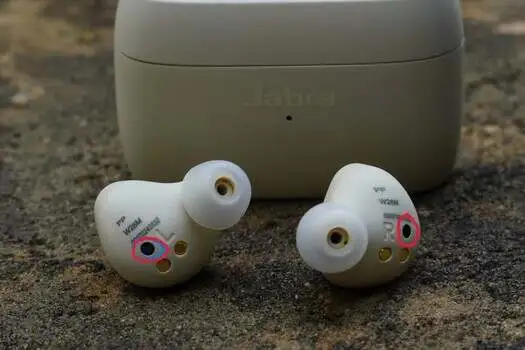
If you notice the Jabra Elite 10 right earbud low volume, especially when it starts normally and then gradually becomes quieter, this is often linked to a blocked acoustic vent rather than a hardware failure.
The Elite 10 has a small pressure equalisation and sound vent (usually located near the marking area on the earbud). When this becomes blocked by dust, sweat, or earwax, it can cause uneven sound output between earbuds. Cleaning this vent carefully with a dry, soft brush or air blower can often restore normal balance.
From a technical point of view, this issue happens because true wireless earbuds rely on precise air pressure balance inside the acoustic chamber. Even a tiny blockage can affect driver movement and reduce perceived volume. In repair environments, technicians usually check for mesh obstruction first before considering any internal speaker fault, as most “low volume” complaints are actually airflow or blockage related rather than damage to the speaker unit itself.
Connection Issues (Pairing and Dropouts):
Connection problems are one of the most reported Jabra Elite 10 common problems, especially when switching between multiple devices like a phone, laptop, or tablet. The simplest fix is to reset Bluetooth pairing completely. Remove the earbuds from all connected devices, disable Bluetooth for a few seconds, then re-pair the earbuds from scratch using the Jabra Sound+ app.
Another cause of connection instability is interference from nearby wireless signals such as Wi-Fi routers or crowded Bluetooth environments like gyms and public transport. Turning off multipoint temporarily can also stabilise the connection if the earbuds keep switching between devices.
From an engineering perspective, the Elite 10 relies on a compact Bluetooth 5.3 chipset with integrated antenna traces embedded inside each earbud shell. If dropouts continue even after resets, technicians check for antenna degradation or weak solder joints between the Bluetooth module and antenna path.
Another hidden issue can be firmware-level instability, where certain software versions mismanage device handshakes during rapid switching. In such cases, re-flashing firmware or reinstalling updates resolves the issue.
Charging Problems (Buds Not Charging or Case Issues):
Charging issues usually appear gradually. The earbuds may charge slowly, stop at a certain percentage, or one bud may stop charging completely. The first step is always physical inspection. Ensure no plastic film is covering the charging pins, and clean both the earbuds and case contacts carefully. Even invisible dust or sweat residue can break the charging circuit connection.
Using a different USB-C cable or wireless charging pad is also important, as power instability from adapters can cause inconsistent charging behaviour. If the case charges but the earbuds do not, re-seating the earbuds multiple times often realigns the internal charging pins.
On a deeper technical level, the charging system in the Elite 10 is based on spring-loaded pogo pins inside the case that connect to tiny gold pads on the earbuds. If these pins lose tension or oxidise, charging becomes intermittent. Technicians usually test continuity across these contact points and inspect whether the internal charging IC in the case is delivering stable voltage.
In some cases, the issue comes from a degraded lithium cell inside the charging case itself, which fails to distribute power evenly to both earbuds. Advanced repair may involve replacing the case battery or microsoldering damaged charging contacts.
Tips for addressing Jabra ELite 10 battery draining fast in older earbuds:
- Turn off unnecessary features like ANC and multipoint
- Keep charging cable and port clean and undamaged
- Use a high-quality charger and USB-C cable
- Avoid overcharging the earbuds
- Let earbuds cool before placing in the case
- Check charging case if issue continues
If your Jabra Elite 10 battery is draining fast, start by reducing power-heavy features and ensuring proper charging habits. Small issues like dirty ports, poor cables, or constant use of advanced features can quickly reduce battery performance, especially in older earbuds.
In-Ear Detection Problem:
Some users also experience Jabra Elite 10 in-ear detection not working, where the earbuds fail to pause or play automatically when removed or worn. First, check in the Jabra Sound+ app that the in-ear detection feature is enabled for the affected earbud. If it still does not respond correctly, performing a full reset of the earbuds often resolves the issue, as it clears temporary sensor or software glitches.
If the problem continues, the issue may be related to fit rather than a fault. Constant pausing or incorrect detection can happen if the earbuds are not seated properly in the ear. In this case, try changing to a different ear tip size to ensure a secure and stable fit, as poor placement can affect how the sensors detect whether the earbud is inside or outside the ear.
Firmware Bugs:
Firmware-related issues are often misunderstood as hardware faults. Users may experience random audio cuts, ANC glitches, or uneven sound after an update. The first step is to open the Jabra Sound+ app and manually check for updates again, even if the system shows it is already updated. Reinstalling or forcing firmware re-sync often clears hidden software errors.
Restarting both the earbuds and the phone after updates is also important, as cached Bluetooth pairing data can conflict with new firmware behaviour. In some cases, performing a full reset and re-pairing resolves performance inconsistencies completely.
From a technician’s point of view, firmware issues affect how the internal Qualcomm-based controller chip manages audio routing, noise cancellation, and device switching.
If firmware becomes corrupted, the earbuds may enter unstable states where audio processing loops incorrectly or one channel becomes delayed. In repair environments, technicians may reflash firmware using diagnostic tools or restore factory-level software partitions. In rare cases, a corrupted memory chip inside the earbud requires full board replacement.
When to Seek Professional Repair:
If none of the above steps resolve the issue, it is likely a hardware-level fault. In the UK and Europe, professional headphone repair services can diagnose internal issues such as battery failure, charging port damage, or Bluetooth module faults. These services typically perform microsoldering and board-level diagnostics rather than simple replacement.
Conclusion:
The Jabra Elite 10 common problems are mostly a mix of simple maintenance issues and software behaviour rather than permanent damage. In most cases, careful cleaning, resetting, and firmware updates solve the problem without any repair needed. However, when internal components like batteries, charging pins, or Bluetooth chips fail, professional repair becomes the only long-term solution.